Widgets
How to Fix the Beat Saber Glow Widget Not Working
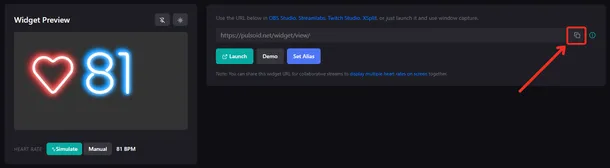
If you’ve recently experienced issues with the Beat Saber Glow widget, here’s how to get it working again. The problem can be solved by refreshing the widget without using your browser’s cache and clearing the OBS browser source cache. Step 1: Reload the widget page without cache Go to your Pulsoid widget configuration. Find the Beat Saber Glow widget you’re currently using on your stream. Click "Copy" to copy its URL. Open that link in a new browser tab. Press CTRL + F5 (Win